ProBound
ConnectWise.Connected in one step.
ConnectWise.Connected in one step.
ConnectWise.Connected in one step.
Linking ConnectWise to your ProBound.ai agent takes a single toggle inside the Agent Setup wizard. No API keys. No dev work. No waiting.
Linking ConnectWise to your ProBound.ai agent takes a single toggle inside the Agent Setup wizard. No API keys. No dev work. No waiting.
Linking ConnectWise to your ProBound.ai agent takes a single toggle inside the Agent Setup wizard. No API keys. No dev work. No waiting.
2026.
4 min read.
ProBound Team
Your AI agent needs the right tools — and ConnectWise is one of them
ProBound.ai isn't just another AI chatbot. It's a platform where you literally hire AI agents — each one with a role, a personality, a knowledge base, and the tools it needs to get work done. Blake handles triage. Grace closes deals. Ella writes proposals. And every one of them can be equipped to work directly inside your ConnectWise environment.The connection itself? One toggle. Inside the agent setup wizard. That's it.
Your AI agent needs the right tools — and ConnectWise is one of them
ProBound.ai isn't just another AI chatbot. It's a platform where you literally hire AI agents — each one with a role, a personality, a knowledge base, and the tools it needs to get work done. Blake handles triage. Grace closes deals. Ella writes proposals. And every one of them can be equipped to work directly inside your ConnectWise environment.The connection itself? One toggle. Inside the agent setup wizard. That's it.
Your AI agent needs the right tools — and ConnectWise is one of them
ProBound.ai isn't just another AI chatbot. It's a platform where you literally hire AI agents — each one with a role, a personality, a knowledge base, and the tools it needs to get work done. Blake handles triage. Grace closes deals. Ella writes proposals. And every one of them can be equipped to work directly inside your ConnectWise environment.The connection itself? One toggle. Inside the agent setup wizard. That's it.
How it works
When you hire or configure an agent in ProBound.ai, you walk through a simple 5-step wizard: Identity, Behavior, Knowledge, Action, and Deploy. ConnectWise is enabled in the Action step — no separate integration page, no API key juggling, no IT ticket required.k
How it works
When you hire or configure an agent in ProBound.ai, you walk through a simple 5-step wizard: Identity, Behavior, Knowledge, Action, and Deploy. ConnectWise is enabled in the Action step — no separate integration page, no API key juggling, no IT ticket required.k
How it works
When you hire or configure an agent in ProBound.ai, you walk through a simple 5-step wizard: Identity, Behavior, Knowledge, Action, and Deploy. ConnectWise is enabled in the Action step — no separate integration page, no API key juggling, no IT ticket required.k
The setup flow at a glance
Every agent in ProBound.ai is created through the same guided wizard. Here's where ConnectWise fits in:
Every agent in ProBound.ai is created through the same guided wizard. Here's where ConnectWise fits in:

Step-by-step: hiring an agent with ConnectWise enabled
01
01
Discover
Discover
Browse the Agent Marketplace
Browse the Agent Marketplace
Browse the Agent Marketplace
Head to the Discover section in your ProBound.ai dashboard. Browse pre-built agents — Triage specialists, SDRs, Account Executives, Onboarding Specialists, and more. Click on any agent card to preview their capabilities and key features before hiring.
02
02
Hire Agent
Hire Agent
Click "Continue to Hire [Agent]"
Click "Continue to Hire [Agent]"
Click "Continue to Hire [Agent]"
Once you've found the right agent, click the blue 'Continue to hire' button in the agent preview modal. This launches the 5-step setup wizard.
03
03
Identity
Identity
Name your agent & set language
Name your agent & set language
Name your agent & set language
Give your agent a name (or keep the default) and select the language they'll speak. Hit Next (Behavior) to continue
04
04
Behavior
Behavior
Choose your agent's tone
Choose your agent's tone
Choose your agent's tone
Select the communication style for your agent — Professional is pre-selected and works well for most MSP use cases. Click Next (Knowledge)
05
05
Knowledge
Knowledge
Upload your custom knowledge (optional)
Upload your custom knowledge (optional)
Upload your custom knowledge (optional)
Optionally feed your agent company-specific knowledge — upload .txt, .pdf, or .doc files, or point to a URL. This makes your agent smarter about your business. Skip this for now if you want to get running fast.
06
06
Action — ConnectWise lives here
Action — ConnectWise lives here
Enable ConnectWise in the Action step
Enable ConnectWise in the Action step
Enable ConnectWise in the Action step
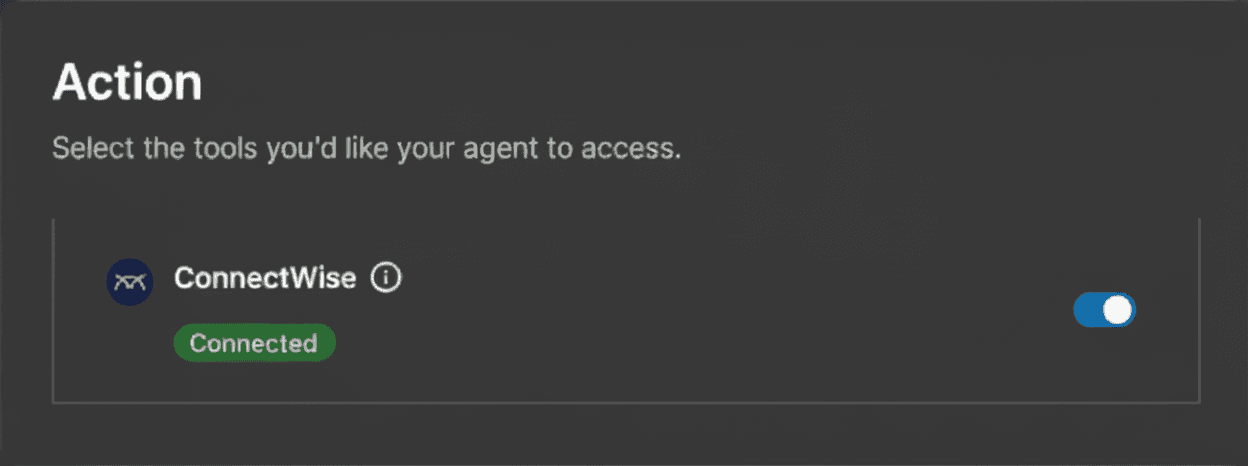
This is where the magic happens. The Action step shows all available integrations for your agent. Find ConnectWise in the list — it'll show as Available — and flip the toggle to on. That's it. Your agent now has access to create tickets, transfer calls, look up contacts, and more — all inside your ConnectWise environment.
What your agent can do with ConnectWise
Once ConnectWise is enabled in the Action step, your agent gains real capabilities inside your PSA — not just read access, but the ability to take action on your behalf. Depending on the agent type you've hired, this includes things like creating and assigning service tickets from inbound calls, pulling up client records and SLA details during a conversation, routing and transferring calls to the right tech or team, and logging interaction notes automatically. A Triage Agent like Blake, for example, can handle a basic hardware support call end-to-end: diagnose the issue, create the ConnectWise ticket, assign it to the right board, and transfer the call to a human tech if escalation is needed — all without a human touching it first.
What your agent can do with ConnectWise
Once ConnectWise is enabled in the Action step, your agent gains real capabilities inside your PSA — not just read access, but the ability to take action on your behalf. Depending on the agent type you've hired, this includes things like creating and assigning service tickets from inbound calls, pulling up client records and SLA details during a conversation, routing and transferring calls to the right tech or team, and logging interaction notes automatically. A Triage Agent like Blake, for example, can handle a basic hardware support call end-to-end: diagnose the issue, create the ConnectWise ticket, assign it to the right board, and transfer the call to a human tech if escalation is needed — all without a human touching it first.
What your agent can do with ConnectWise
Once ConnectWise is enabled in the Action step, your agent gains real capabilities inside your PSA — not just read access, but the ability to take action on your behalf. Depending on the agent type you've hired, this includes things like creating and assigning service tickets from inbound calls, pulling up client records and SLA details during a conversation, routing and transferring calls to the right tech or team, and logging interaction notes automatically. A Triage Agent like Blake, for example, can handle a basic hardware support call end-to-end: diagnose the issue, create the ConnectWise ticket, assign it to the right board, and transfer the call to a human tech if escalation is needed — all without a human touching it first.
Pro Tip
Start with a Triage Agent and enable ConnectWise in the Action step. Watch it handle a few real inbound calls. Once you've seen the ticket creation in action, you'll immediately know which other agents to hire and which tools to enable next.
Pro Tip
Start with a Triage Agent and enable ConnectWise in the Action step. Watch it handle a few real inbound calls. Once you've seen the ticket creation in action, you'll immediately know which other agents to hire and which tools to enable next.
Pro Tip
Start with a Triage Agent and enable ConnectWise in the Action step. Watch it handle a few real inbound calls. Once you've seen the ticket creation in action, you'll immediately know which other agents to hire and which tools to enable next.
Frequently asked questions
Do I need to set up a ConnectWise API key separately?
Can different agents have different tools enabled?
Can I add or remove ConnectWise after the agent is already deployed?
What ConnectWise version is supported?
Frequently asked questions
Do I need to set up a ConnectWise API key separately?
Can different agents have different tools enabled?
Can I add or remove ConnectWise after the agent is already deployed?
What ConnectWise version is supported?
Frequently asked questions
Do I need to set up a ConnectWise API key separately?
Can different agents have different tools enabled?
Can I add or remove ConnectWise after the agent is already deployed?
What ConnectWise version is supported?
Hire your first ConnectWise-powered agent today.
Set up takes minutes. Your first call can be handled by AI before end of day.
Start Free — No Card Required
Hire your first ConnectWise-powered agent today.
Set up takes minutes. Your first call can be handled by AI before end of day.
Start Free — No Card Required
Hire your first ConnectWise-powered agent today.
Set up takes minutes. Your first call can be handled by AI before end of day.
Start Free — No Card Required


Subscribe to our Newsletter
Join our newsletter for insights on building, deploying, and scaling AI-driven solutions.
Subscribe to our Newsletter
Join our newsletter for insights on building, deploying, and scaling AI-driven solutions.
Subscribe to our Newsletter
Join our newsletter for insights on building, deploying, and scaling AI-driven solutions.
ProBound


© 2026 ProBound. All rights reserved.
ProBound
© 2026 ProBound. All rights reserved.
ProBound
© 2026 ProBound. All rights reserved.